


In the past, HTTPS was predominantly used by financial websites, but today, having a website on HTTPS is commonplace. As of this year, most sites already work on HTTPS, since top browsers have already taken as a basis to give preference to sites on HTTPS.
What is HTTPS?
HTTPS is the standard HTTP protocol operating over a secure SSL connection, providing maximum protection against spying and personal data theft. This enhanced security is why HTTPS sites are considered more secure. Any data you submit on these sites remains safe, which is why Google prioritizes HTTPS over HTTP in search rankings.
Sites on https are more trusted by users, the Google search engine, browsers and other software products. Also, https has a direct impact on improving the ranking of the site, which caused a massive wave of transition in the process of SEO promotion of sites. So, let's go!
How to technically switch your site to HTTPS?
If your website is on "Hosting Ukraine".
This process is straightforward! It takes just 2 minutes. Access your site settings, scroll down as shown in the screenshot, and enable the HTTPS redirect. A 301 redirect will be automatically set up. Just 2 clicks, and your site is now on HTTPS!
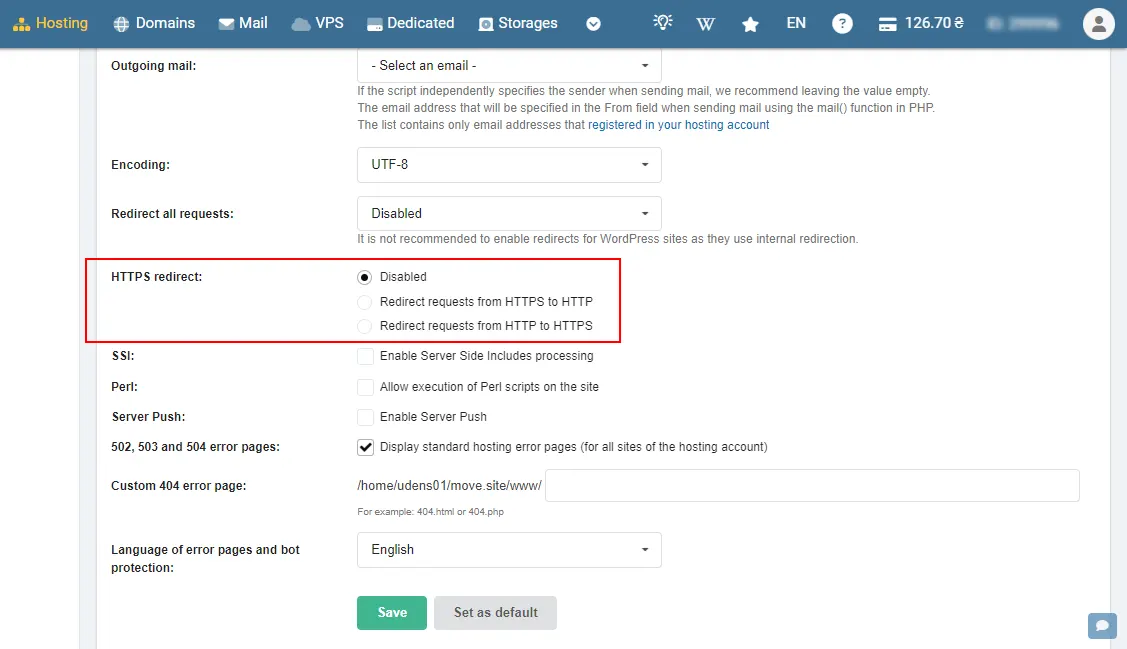
If you're using another hosting provider.
The process can be more complex if your hosting doesn’t have similar settings. In this case, you’ll need to configure everything manually:
- Check Technical Capabilities: Contact your hosting support to see if there’s a ready-made solution or instructions available.
- Purchase an SSL Certificate: This usually costs between $15-$20. You’ll receive a certificate file, a key, and a chain. Save these details.
- Upload the SSL Certificate: In your hosting control panel, find the SSL certificates section and upload your certificate by filling in the required fields.
- Activate the SSL: After adding it, your SSL should appear in the redirects section. Select it and enable it.
- Set Up a 301 Redirect: Add a 301 redirect from HTTP to HTTPS in your .htaccess file (more on this below).
- Check the SSL certificate validity here.

The kind "Hosting Ukraine" has written instructions on how to upload an SSL certificate. Perhaps it will help you on another hosting.
301 redirect from http to https via the .htaccess file
There are 2 ways:
RewriteCond %{HTTPS} off
RewriteRule ^(.*)$ https://%{HTTP_HOST}%{REQUEST_URI} [L,R=301]
and method 2:
RewriteCond %{HTTP:X-HTTPS} !1
RewriteRule ^(.*)$ https://%{HTTP_HOST}/$1 [R=301,L]
If you successfully implemented the above steps, let’s move on to indexing your HTTPS site.
I've already transitioned my site to HTTPS. What's Next?
- Add Your HTTPS Site to Google Search Console as a new property.
- Check the 301 Redirect: Ensure that the redirect from HTTP to HTTPS is working correctly.
Domain Merging in Search Console.
We spent a long time looking for this info, and finally found in the documentation that "domain merging is possible in all cases except when transitioning to HTTPS." After adding your site to Search Console, you'll need to wait for Google to merge the sites, which usually takes up to 10 calendar days.
That’s all for now! Thank you for reading, and we look forward to seeing you on our blog again soon.
 Order a service