


On March 1, 2018, something we'd been waiting for years happened: Google announced the launch of Merchant Center and Google Shopping in Ukraine, although in many countries this had happened much earlier. This became a new platform for promotion and contextual advertising in Ukraine, opening up a host of new advantages for online stores.
* This article was written in 2018, immediately after Google Shopping launched in Ukraine, and was gradually updated. It has now been completely rewritten to ensure the information is current. So, let's get started.
Google Shopping - advertising of online store products across all Google platforms, from search to YouTube.
Let's dwell on the definition of Google Shopping:
- this is advertising for products and only products, as Google Shopping is a product-specific ad platform, allowing only product advertising;
- only for online stores, as all sites are moderated for compliance with e-commerce;
- across all possible Google platforms, as Google Ads' product advertising capabilities have far surpassed the horizons of Google Search.
Google Shopping is often called: product advertising, trade advertising, which are essentially the same thing, just synonyms.

Google Shopping ads display a product image, price, name, and a link to the product page, ensuring maximum conversion for online stores. Google Shopping ads look like this:
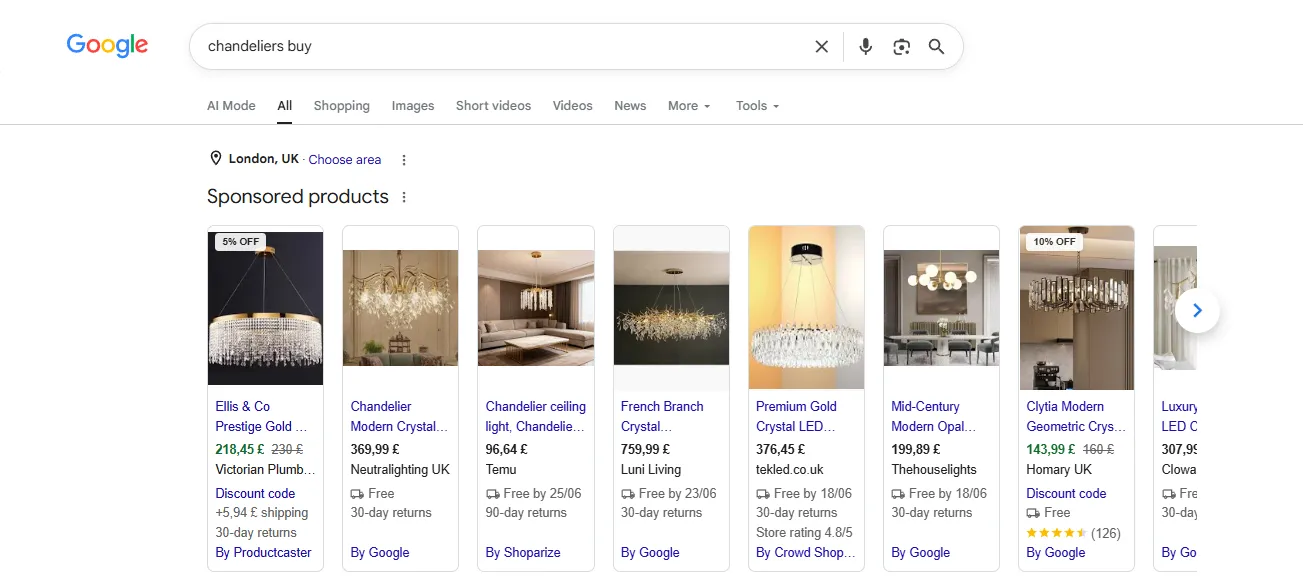
The emergence of Google Shopping has completely changed the nature of how consumers search for products and the concept of promoting online stores, namely:
- Users reduced their searches for products on websites and began to search and select products in Google search results, as a result of which they began to go to websites only to perform some action, which ensured a much higher conversion rate than was previously the case with search advertising.
- Online store promotion focused on Google Shopping, as this channel began to generate 70-85% of all purchases.
- Search advertising, SMM, and SEO promotion took a back seat, as online store owners began counting their money.
Google Shopping has become an economic miracle for many online stores, as it provides high-converting traffic at a minimal cost.
This was a breakthrough in the development of online stores. Those who launched Google Shopping first reaped significant economic dividends. This especially coincided with the COVID-19 pandemic, when during the quarantine, demand for remote orders and delivery increased, causing sales across all online stores to skyrocket.
Currently, working with Google Shopping involves more management, administration, and optimization. However, there are still some projects that haven't launched this product yet. So, let's talk about the Google Shopping launch next.
The Google Shopping launch consists of several stages:
- Preparing your website for online sales;
- Setting up Merchant Center and passing moderation;
- Setting up Google Ads;
- Creating a shopping campaign.
* We will only list the mandatory points, since all sites are different and the list may be supplemented in each individual case.
➊ Preparing a website for online sales
Your online store should be technically complete by default, with the following elements required:
👉 Merchant Center feeds.
Feeds are special product export files according to Merchant Center specifications and are updated daily.
👉 Return and exchange policy.
A page where you must describe the online store's policy regarding returns and exchanges of goods.
👉 Online payment.
The user must be able to pay for the product online.
👉 Courier delivery.
The user must be able to receive the goods at the door.
➋ Setting up Merchant Center and passing moderation
Merchant Center is an electronic product consolidation system that simultaneously imports products from a website and exports them to Google Ads for further advertising with individual settings in the Google Shopping marketplace.
Before Merchant Center, products were uploaded to Google Ads via a spreadsheet feed. Now, this is done through Google Merchant Center, which offers a host of advantages:
👉 More options for uploading additional product information: brand, model, availability, promotion, promotion end date, rating, reviews, and more.
👉 Advanced product upload methods via feeds: Excel files, XML files, downloading from a server + API.
👉 Comprehensive product statistics.
👉 Syncing with Google Ads and other services.
👉 Product approval status information.
👉 Consolidation of store and product reviews, which is used for further advertising.
👉 Exporting products to Google Ads, allowing you to create product-related campaigns, including:
- Shopping campaigns (popularly known as Google Shopping);
- Performance Max;
- Display Network campaigns;
- Video campaigns.
👉 Listing products in the Google Shopping marketplace (similar to the "flights" tab, which concentrates paid and free product offerings from online stores). According to the developers' presentation, Google Shopping looks like this:
Merchant Center account registration begins with the completion of the following business details:
- contact information;
- feeds;
- return and exchange policy;
- delivery terms.
Once all the information has been submitted, the Merchant Center account moderation process begins, which takes 3-4 business days. The online store is manually reviewed by a Google specialist.
The main principles of Merchant Center account moderation are:
The user should be able to purchase a product online without risk or fraud, pay by card, and receive it at their door.
That's why courier delivery, card payment, and a return and exchange policy are mandatory conditions for Merchant Center moderation.
➌ Google Ads
Registering a Google Ads account immediately includes payer verification. Currently, every account that undergoes verification must complete payer verification within 30 days.
After creating an account, synchronize your accounts so that when creating a trading campaign, you can specify the Merchant Center from which to source products.
➍ Creating a Google Ads Shopping Campaign
A Google Ads Shopping campaign is created in a few steps:
- new campaign;
- do not specify a goal;
- shopping campaign;
- configure the settings and save.
Ultimately, by running Google Shopping ads, you get exposure to your entire online store's product range without creating ad groups and, most importantly, with targeted traffic at a minimal cost.
Having implemented numerous projects, we've recorded an overview video on how to run Google Shopping ads and pass Merchant Center moderation. We highly recommend watching!
Since the launch of Google Shopping, we've completed over 200 projects of varying complexity and recorded numerous videos on various topics, compiling them into our YouTube playlist. Many of the tips remain relevant today.
Кампании Google Shopping постоянно эволюционируют. First, there were standard campaigns, then Smart Shopping campaigns, and since the beginning of 2022, they've been transformed into Performance Max campaigns (campaigns across all promotion channels). You can learn more about this in the Google Shopping Performance Max video:
For a more detailed Google Shopping launch plan, please contact the agency or submit a request below.
Frequently asked questions about Google Shopping:
✔ What is the cost per click in Google Shopping?
⭐ When it launched in 2018, the cost per click was as low as 0.01 UAH. Now it's growing rapidly, and in some niches, it can even be higher than search results.
✔ What is the conversion rate and order value?
⭐ It all depends on the niche and the competitiveness of your product in the market.
✔ How many products can I advertise?
⭐ From 1 to infinity. The standard Merchant Center limit is 250,000 products, but it can be increased.
✔ How do I enter keywords?
⭐ Product names are keywords, plus word forms and additional words derived from them.
✔ What if I don't have a programmer for the feed?
⭐ Look for ready-made options for the CMS. Or create a feed in Excel — we can help.
✔ Is Google Shopping services really feasible?
⭐ Yes! We've seen this happen in our practice, but there's a risk of blocking.
✔ How fast can I launch?
⭐ Merchant Center moderation takes up to 3 business days, and shopping campaigns can be moderated within 2 business days.
✔ Can I launch Performance Max immediately?
⭐ We don't recommend it, as Performance Max campaigns are based on accumulated data and use artificial intelligence. First, the account must set up tagging, run a standard campaign, accumulate data, and then switch to Performance Max.
 Order a service