



This is a topic that technically became possible in 2024, but has only recently gained popularity thanks to the development of Meta advertising tools.
Previously, Facebook catalog ads consisted of product photos with links to the product details. Now, you can upload product videos to your ads. This, in turn, increases the CTR for dynamic ads and dynamic remarketing on Facebook and Instagram.
You first need to add your video to the Facebook catalog in Commerce Manager, and then enable video display in ads in your Ads Manager.
There are two ways to add videos to the Facebook catalog.
➊ Automatically
In your Commerce Manager account, in the catalog settings, you need to activate the option - "Automatic product video updates":
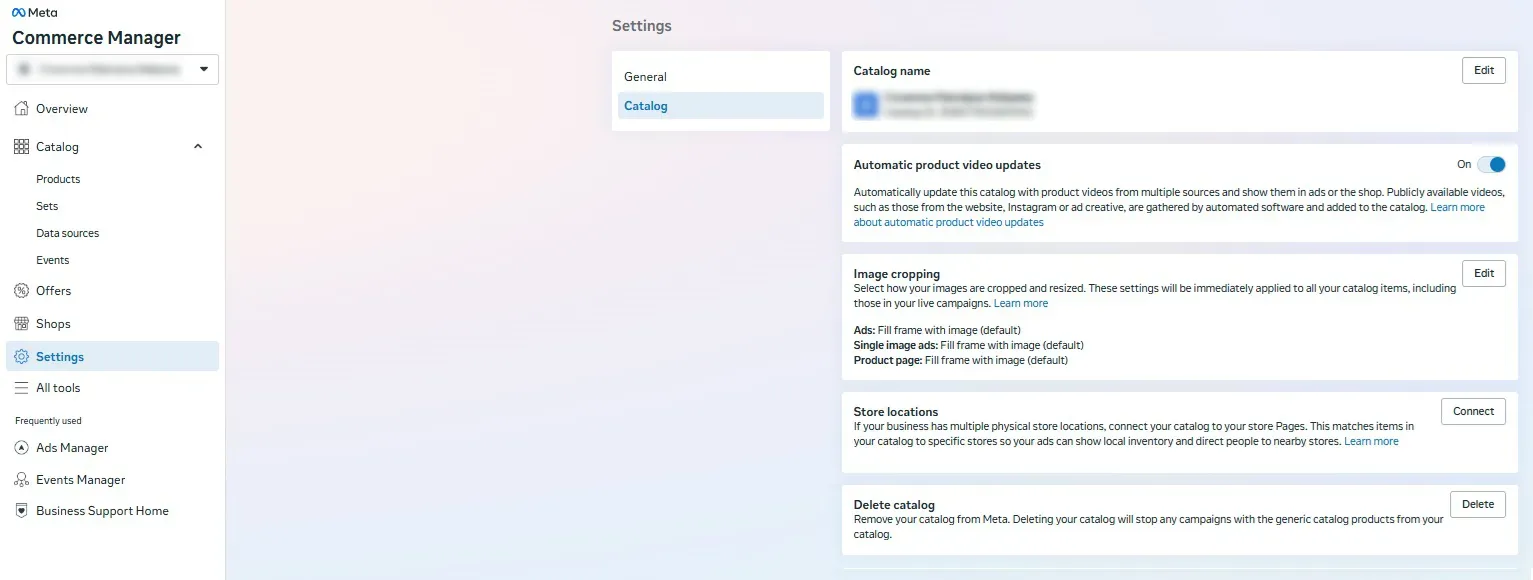
Once activated, videos will be added to the catalog within 24 hours.
* If you manually add a video for a specific product, this entry will take precedence over automatic entry.
➋ Via feed
If you have 1 video in your product card, add the following line to your feed:
<g:video>https://video file link</g:video>
If you have several videos in your product card, then add several lines with a numbered list of videos, namely:
<g:video[0].url>https://example.com/videos/shoes_hero_4_5.mp4</g:video[0].url>
<g:video[1].url>https://example.com/videos/shoes_1_1.mp4</g:video[1].url>
This method is relevant if you have several video formats (for example - 1:1, 9:16, 4:5). You can add a maximum of 20 videos to a single product.
If you have any difficulties with XML or CSV feed fields, you can enable field mapping in the feed source.
* We recommend adding videos to the Facebook catalog using Method 1, as adding videos via feeds has been shown to work incorrectly, and the technical documentation is inconsistent.
Additionally, you can follow the feed specification fields for Facebook Commerce Manager.
Video requirements
- Minimum resolution 500x500;
- Duration unlimited;
- Maximum file size:
- Updating via Commerce Manager - 100 МБ;
- Updating via feed - 200 МБ.
- Main formats - MOV, MP4, MPE, MPEG, MPEG4;
- Videos must be uploaded to a hosting site and accessible via a direct link from http:// or https:// (YouTube links are not acceptable).
Using video in catalog ads
Once you add videos to your Facebook Commerce Manager catalog, you'll have the option to turn videos on or off at the ad level.
Specifically, when creating an ad, you'll see a checkbox with the option "Allow product videos":
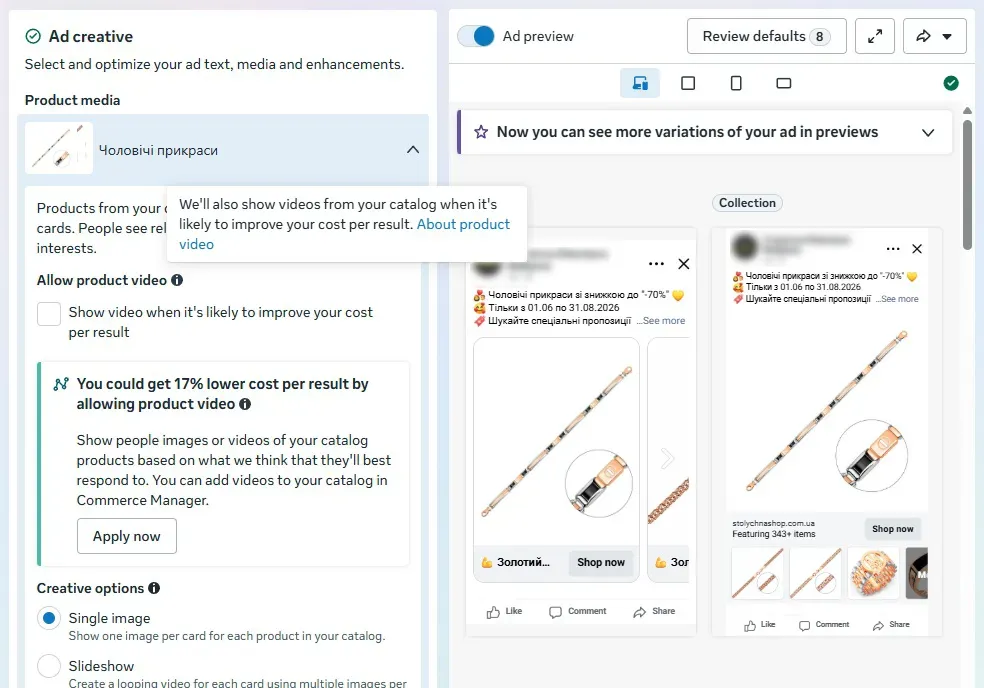
Additionally, you will have the option to automatically trim your video, but it's best not to enable this, as it may ruin the creative process.
Well, that's all for now. We wish you success and the best sales on Meta channels.
 Order a service